Posts

Showing posts with the label SQL Server

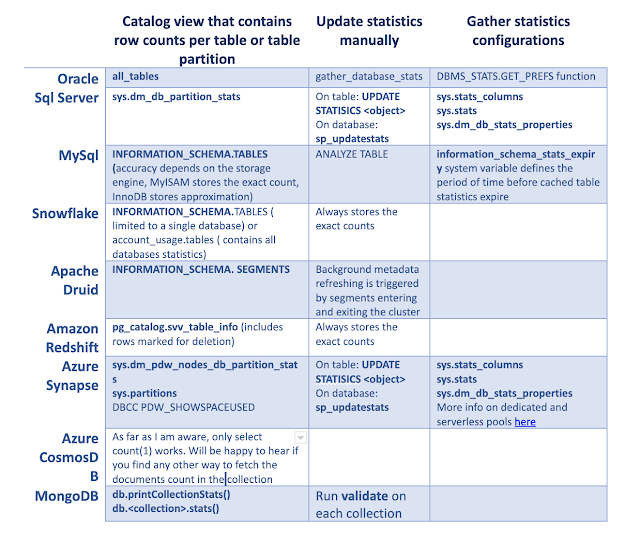
Doing things right or do right things? How to find row count of every table in database efficiently.
Image
One Data Engineer had to replicate data from one well-known database vendor to a less-known database vendor. He used select count(*) to validate that tables row counts were equal on the source and target. It worked so slowly, that he got fired without ever knowing whether the table's content was equal or not. Often laziness is a first step towards efficiency. Rather than doing count(*) on each table, the unfortunate DBA could have used internal statistics that every decent database vendor is maintaining, stored in the system views. Need to take into consideration that it will never be 100% accurate and will depend on a few things How often do database objects change What is the internal or manual schedule for statistics refresh. For a lot of database vendors, statistics will get refreshed automatically only when the changed data is more than 10% of the total table rows but this is usually configurable per table. The percentage of rows used to calculate the statistics. The most accu...

Embrace Delta Lakes and reduce the SQL Server compute resources contention

Image
Data management tools are evolving at a great speed, and this can be overwhelming. Data volumes and variety evolve and grow as well. Data Engineers are required to transform those waterfalls of data into business insights. The data is arriving from a vast range of sources, like social-media networks, 3rd party partners or internal micro services. If you are experienced SQL Server DBA, you know how versatile the product is. It is very tempting and feels correct to use the tool that you know the best. We can use SQL Server for almost any data management task. We can use SQL Server to watch over the storage for a new unprocessed files. We can load the raw data into SQL Server Staging Area SQL Server database. We can efficiently clean, enrich and aggregate the data using highly expensive relational database resources (even if you are not using SQL Database in the cloud, every Enterprise edition core still cost about $7K) SQL Server Relational engine high cost echoes the product complex...

SQL Server Insert Parent and Child Records with One Statement

Image
A few days ago, one of the developers asked me if that was possible to generate test data by performing multiple nested  INSERT statements , each of them involving inserting new rows into several parent tables and  in the same statement  reusing the autogenerated primary keys for the foreign key columns in the child table.  The developer was working with PostgreSql and so I tried to find a solution for both PostgreSql and SQL Server to learn the differences in the ANSI features implementation in these different database systems. Read the solution on my blogpost here:  https://www.mssqltips.com/sqlservertip/6142/sql-server-insert-parent-and-child-records-with-one-statement/ Yours, Maria P.S.  (Picture is taken from Kendra Little website)  

Data Exploration with Python and SQL Server using Jupyter Notebooks

Image
  When it comes to data-driven research, presenting the results is a complicated task. It is convenient to have an initial dataset handy, if anyone asks to re-run the computations or wants to interact with the data.  Reproducibility across a number of fields is a tough task and there aren’t too many tools that can help. It’s easy to show numbers in Excel or in Power Point, but in many use cases, the context and the pathway to the results is lost. What is the Jupyter Notebooks? Jupyter Notebooks is a great tool that is becoming more and more popular these days. Jupyter Notebook combines live code execution with textual comments, equations and graphical visualizations. It helps you to follow and understand how the researcher got to his conclusions. The audience can play with the data set either during the presentation or later on. Some people say that Project Jupyter is a revolution in the data exploration world just like the discovery of Jupiter's moons was a revolu...

Changing partition_id in SQL Server partition tables

Image
When switching partition in or out, partition_ids are changing for both source and destination, even if destination is a regular table. At the beginning I thought that new id's are being issured but it appears that SQL Server simply exchanging ids of source and destination. This can help to get alert that partition has been changed or used in applications that track data movements. Here is a sample script and result screenshot: -------------------------------------- CREATE PARTITION FUNCTION [f](datetime) AS RANGE RIGHT FOR VALUES ('20091014','20091015') GO CREATE PARTITION SCHEME [s] AS PARTITION [f] ALL TO ([primary]) GO create table t ( i int, d datetime) on s(d) insert into t select 1,'20091015 01:01' union all select 2,'20091015 04:01' union all select 3,'20091015 05:01' drop table t1 create table t1 ( i int, d datetime) on [primary] select * from sys.partitions where object_name(object_id) IN ( 't' ,'t1') order by object...

Statistics are saved on table level and not on partition level (both SQL 2005 & 2008

Currently table statistics and histograms are saved per table and not per table partition. Many environments that i see experience real performance degradation when migrating from view partitions to native partitions because, thanks to partition elimination, we never work on table level and always on partition level so statistics that exist only on table level give wrong estimations when data spread not equally between partitions, for instance, when some value appears a lot in one partition and only once in another, estimations for partition where the value appears once are bad. I see this behavior in both SQL 2005 and I was sure that this will be changed in SQL 2008 but the behavior stayed the same.

Table and Index Organization chapter in Books Online

Image
In the Books Online, in the Table and Index Organization chapter there is such schema: I think, this is not correct , because, there there is only one set of indexes and only one heap per table, and each b-tree or heap separated into partitions. Even in table sys.partitions, partitions are stored as object_id ->index_id->partition_id It should look like this