Posts

SQLCMD Mode: give it one more chance

Image
- Click on me. Choose me. - asked one forgotten  feature when some bored DBA was purposelessly  wondering through the Management Studio menu at the end of her long and busy working day. - Why would I use you? I have heard of no one who does. What are you for? - perplexedly wondered aged and wise DBA. At least that DBA thought she was aged and wise though each day tried to prove to her that she wasn't. - I know you. You are quite lazy. Why would you do additional clicks to move from window to window? From Tool to tool ? This is irritating, isn't it? I can run windows system commands, sql statements and much more from the same script, from the same query window! - I have all my tools that I‘m used to, I have Management Studio, Cmd, Powershell. They can do anything for me. I don’t need additional tools. - I promise you, you will like me. – the thing continued to whine . - All right, show me. – she gave up. It’s always this way, she thought sadly, - easier to agree than...

Real tortoises keep it slow and steady. How about the backups?

Image
… Four tortoises were playing in the backyard when they decided they needed hibiscus flower snacks. They pooled their money and sent the smallest tortoise out to fetch the snacks. Two days passed and there was no sign of the tortoise. "You know, she is taking a lot of time", said one of the tortoises. A little voice from just out side the fence said, "If you are going to talk that way about me I won't go." Is it too much to request from the quite expensive 3rd party backup tool to be a way faster than the SQL server native backup? Or at least save a respectable amount of storage by producing a really smaller backup files?  By saying “really smaller”, I mean at least getting a file in half size. After Googling the internet in an attempt to understand what other “sql people” are using for database backups, I see that most people are using one of three tools which are the main players in SQL backup area:  LiteSpeed by Quest SQL Backup by Red Gate SQ...

Is your TRY worth catching?

Image
A very useful error handling  TRY/CATCH  construct is widely used to catch all execution errors  that do not close the database connection. The biggest downside is that in the case of multiple errors the  TRY/CATCH  mechanism will only catch the last error. An example of this can be seen during a standard restore operation. In this example I attempt to perform a restore from a file that no longer exists. Two errors are being fired:  3201  and  3013 : Assuming that we are using the  TRY  and  CATCH  construct, the  ERROR_MESSAGE ()  function will catch the last message only: To workaround this problem you can prepare a temporary table that will receive the statement output. Execute the statement inside the  xp_cmdshell  stored procedure, connect back to the SQL Server using the command line utility  sqlcmd  and redirect it's output into the previously created temp table.  After r...

I'm moving !!!!!

Image
I am truly exited to move this blog to SQLblog.com ! http://sqlblog.com/blogs/maria_zakourdaev/default.aspx You are more than welcomed to drop by. Stay tuned Over and out ;)

Replication frustration: Adding article does not create the table on subscriber

Working with the SQL Server replication is not a great pleasure. Working with the SQL Server replication replication is not a great pleasure, when all is working as you expect. Working with the SQL Server replication replication is not a great pleasure at all, when something is not working and there is no documentation. Working with the SQL Server replication replication is not a great pleasure at all, when something is documented but simply is not working. We have been fighting with some really weird behavior during the last few month. This is a basic transaction replication feature: adding article on the table supposed to create table on subscriber. It's working on some servers. And it doesn't work on some servers. Regardless the SQL Server version, whether it is SQL Server 2005 sp4 or SQL 2008 R2 sp1. The most amazing thing is that it's reproducible and not working on production environment ONLY. We could never reproduce it on the QA servers. The scenario is pretty ...

DBCC LOGINFO on SQL 2005 causes “non-yielding processes on scheduler” errors and server timeouts

Image
If you are using DBCC LOGINFO in the production environment and you are lucky enough to still have an instance of SQL Server 2005 which, suddenly out of the blue, started throwing “non-yielding processes on scheduler” errors into the error log and becomes unresponsive, then you should know that there can be a connection between the two. It is most probably a bug in the DBCC, reproducible on SQL 2005 instances only. It’s been fixed for SQL 2008 and up. Maybe this is one of the reasons why this DBCC is undocumented… I have the following procedure which loops through all the databases and checks the number of VLFs (virtual log files - logical sections in the transaction log file allocated each time a log growth occurs). It’s using an undocumented, but very useful for this purpose, DBCC LOGINFO. Unfortunately, there was a database snapshot on the server and the procedure got executed there as well as on other databases (not on purpose, of course, just used sp_msforeachdb procedure with...

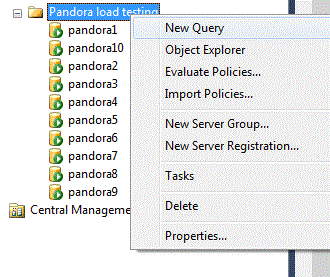
Easy load testing using Management Studio

Image
There is an easy way to open several connections to your SQL Server in order to perform load testing. You can use Management studio "Multiple Server Query Execution" feature. This feature is usually used to run the same query against multiple servers but we also can use it for a load or stress testing. In the registered servers tab create a group with the same name as your server that you are planning to use for the load testing. Inside the group create 10 or more connections to the same server, just making sure that in the server alias field you add number to your server name otherwise Management Studio will not allow to create two server connections with the same alias. Easy way to add multiple connections is by editing Management Studio connections xml file that you can find in "C:\Users\<> \AppData\Roaming\Microsoft\Microsoft SQL Server\110\Tools\Shell\RegSrvr.xml", you can simply copy the connection multiple times, still changing alias name for each ne...