Posts

MySql default configurations in GCP cloud and in Azure cloud

We recently had a late-night memory troubleshooting session on MySQL in the GCP cloud. I am sharing with you my MySQL learning outcomes and review of GCP default Cloud MySQL configuration related to performance and memory management. I will go over the main MySQL performance configuration parameters and what the GCP defaults are. I have also looked up Azure defaults to see iare f there are any differences. GCP Cloud MySQL configurations seem to favour writing workloads. On Azure Database for Flexible server, some parameters are not present, for instance, unique_checks and foreign_key_checks disabling. innodb_buffer_pool_size What it is & best practices: Memory area where InnoDB caches table and index data. Best practice: ~80% of instance memory (can be smaller if you only use a small fraction of your data). GCP default: 70% of total instance memory Azure default: 25% of total instance memory innodb_log_file_size What it is & best practices: Redo log,...
Snowflake integration with Microsoft Azure Open AI service

Did you know that Snowflake is working on integrating Microsoft Azure Open AI service? Companies that use Snowflake as their Data Warehousing solution, can now use Azure Open AI through Snowflake CortexAI - Snowflake's managed AI services. This is available not only to Snowflake clients using Snowflake on Azure. Clients from any cloud and any region can now build AI-powered apps or data agents. Open AI models will run within the security boundaries of the Snowflake data cloud, providing unified governance, access controls and monitoring. Even more interesting: there will be the opposite collaboration as well. Cortex AI agents will be available from within Microsoft Teams Copilot and Microsoft 365 Copilot so users can interact with their data stored in Snowflake using natural language. This integration will become generally available in June 2025

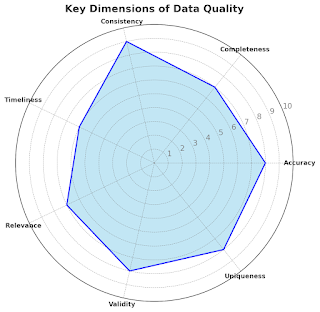
Understanding the Pillars of Data Quality

Image
Imagine, you are baking a cake. You have all the ingredients except eggs. Of course, you could improvise but most probably instead of the moist chocolate cake, you end up with a dry science experiment. Incomplete data leaves everyone unsatisfied. During the decision-making party, every data quality dimension is an important guest with a unique vibe: Good Data should be C omplete , when all data attributes, that describe data in its fullness, are present as a part of your data. This guest keeps the party snacks stock full and makes sure no one gets hungry. Incomplete data leads to half-baked insights. Good Data should be Accurate . This means that the data correctly describes its objects and accurately reflects the reality. This party guest is a perfectionist, checking that the playlist is perfectly chosen. Good Data should be Timely . This means that the data is fresh. No one wants to eat last week's sushi. It's not only unappetizing; it is downright risky. This guest makes sur...

The backbone your data pipelines have been waiting for.

Image
Kafka isn’t just a buzzword—it’s the backbone your data pipelines have been waiting for. Who new that messaging system, like Apache Kafka should hold a central place in a Data Engineer toolbelt.  Apache Kafka is a low-latency distributed data streaming platform for real-time data processing. Kafka can handle large volumes of data and is very helpful for distributed data integration projects. Top 2 reasons why you might need Kafka in your Data Integration architecture 1. Support multiple destinations by decoupling data producers and data consumers. Data in source will be processed only once, which lowers an overall cost in consumption-based data producer databases and we can add new/change existing destinations without changing the extraction components. 2. Ability to deal with massive amounts of data , supports high throughput and scalability. Decoupling pipeline extract and load stages is an important Data Integration principle and can improve pipeline flexibility, extract and loa...

Beyond clicks and sales

My son told me yesterday that data analysis is boring. "Total money wired from one account type to another. The number of umbrellas sold over time to various age groups. Website clicks from different countries, broken down by time of day. Nothing exciting," he said. So I asked him: "What about analyzing the contents of garbage cans? Wouldn't that be fascinating? Or fridge contents—imagine predicting a family’s potential health issues based on what they eat (or forget to throw out). Dream logs could be just as intriguing. Imagine categorizing dreams by themes and emotions, analyzing trends based on sleep habits and cultural influences. How about haunted places and paranormal activity reports? Tracking ghost sightings by location, identifying patterns, and finding unexpected geographical correlations—now that’s a dataset with mystery! And then there’s one of my favourites: analyzing excuses for being late to work. Categorizing them by season, industry, or geography cou...

Unlocking Microsoft Fabric: A Simple Guide when you only have a personal account.

Image
" You cannot create a Microsoft capacity using a personal account. Use your organizational account instead." What a disappointment and frustration! I've been trying to set up Microsoft Fabric for a while now and figure out how to work around this error. I use my personal Gmail for an MVP subscription to learn and experiment with Azure services. When I visit app.fabric.microsoft.com and try to use my private Gmail address, I keep getting a similar message: It's frustrating because I'm eager to dive into Fabric and explore its capabilities. I would get the same error trying to set up Azure Data Catalog, PowerBI embedded, and more. What are the different account types and how do they differ? A work or school account is created through Active Directory or other cloud directory services, such as Microsoft 365. On the other hand, a personal account is one that's manually created for individual use, consisting simply of a username and password. After digging into ...

ETL to ELT journey: Break free your Transformations and discover Happiness and Data Zen

Every data integration pipeline consists of 3 stages: Data Extraction (E), Data Transformation (T) and Data Load (L) During the  Data Extraction stage, the source data is read from its origins: transactional databases, CRM or ERP systems or through data scraping from web pages. During the  Data Transformation stage, the necessary modifications are applied to the source data. This includes data filtering, enrichment or merging with existing or other source datasets, data obfuscation, dataset structure alignment or validation, fields renaming and data structuring, according to the canonical data warehouse model.  During the Data Loading stage, the data is stored in the pipeline destination, which could be a staging area, data lake or data warehouse. There are two principal methods for the data integration process: transferring it from where it originated to the destination, where the data will be used for analysis, ETL and ELT. The difference between ETL and ELT pipelines...